Threat Modeling the Basic AI Agent
Apply the STRIDE framework to the greeting agent — map data flows, identify trust boundaries, and propose concrete mitigations.
Why Threat Modeling for AI Agents?
In traditional software, security is mostly about keeping unauthorized users out — firewalls, authentication, access control. In agentic AI, the threat surface is different. The agent itself can be manipulated into unsafe behavior. A user doesn’t need to break in; they just need to say the wrong thing in the right way.
Threat modeling is how you think through that systematically, before something goes wrong. It answers four questions in order:
- What are we building? — Map the system: components, data flows, external dependencies.
- What can go wrong? — Identify threats using a framework like STRIDE.
- What are we going to do about it? — Implement mitigations: validation, encryption, rate limits, logging.
- Did we do a good job? — Test whether the controls actually work.
This lesson works through all four steps for the greeting agent you built in Lesson 1.
The System: Data Flow Overview
Before identifying threats, you need a clear picture of what the system does and how data moves through it. The greeting agent has five key data flows:
- User → Agent (HTTP): A user types a prompt in the browser. It travels to the
adk webprocess on port 8000 — unencrypted, over localhost. - Agent →
.envfile (file system read): At startup,agent.pyreadsGOOGLE_API_KEYfrom the.envfile. - Agent → Gemini API (HTTPS):
agent.pysends the user prompt plus the API key credential to Google’s servers. - Gemini API → Agent (HTTPS): The LLM response travels back to
agent.pyover HTTPS. - Agent → Browser (HTTP): The final response is sent back to the user’s browser for display.
Each arrow in this picture is a potential attack surface. The question is: who controls that channel, and what happens if the data on it is tampered with?
Trust Boundaries
A trust boundary is wherever data crosses from a lower-trust context into a higher-trust context — or vice versa. Every boundary is a point where you need to ask: what happens if the data arriving here is malicious or wrong?
For the greeting agent, at least three clear boundaries exist:
| Boundary | Components | What crosses it | Why it matters |
|---|---|---|---|
| 1 | Browser ↔ adk web | User prompt (text) | User input is untrusted — could contain injected instructions |
| 2 | agent.py ↔ Gemini API | Prompt + API key credential | External network; key must never appear in plaintext logs |
| 3 | .env file ↔ agent.py | GOOGLE_API_KEY value | File permissions determine who can read the credential |
A fourth boundary worth considering: is there a boundary between the adk web dev UI process and agent.py? What about between the Google Cloud project and the open internet? Every new component you add creates new boundaries to examine.
Data Flow Diagrams
A Data Flow Diagram (DFD) makes trust boundaries visible. Two levels matter for threat modeling:
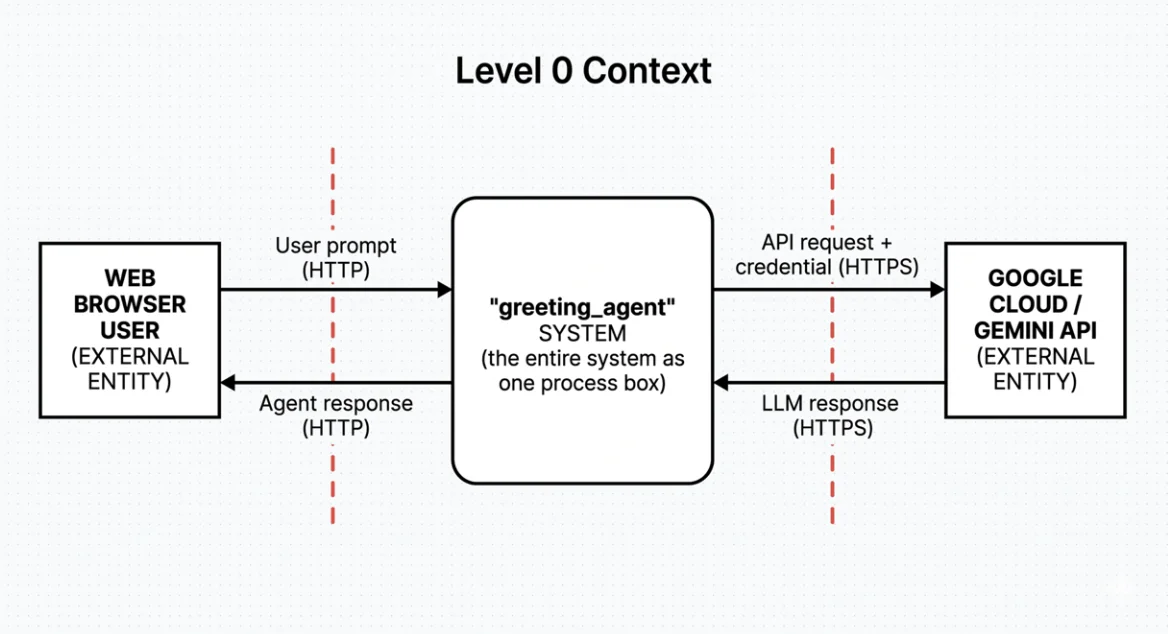
Level 0 — Context Diagram The highest-level view. The entire system is one box. External entities (browser, Google Cloud) are rectangles. Arrows show what data flows in and out. Red dashed lines mark trust boundaries.
Level 1 — Decomposed View “Explodes” the system box into its internal components. This is where threats become specific.
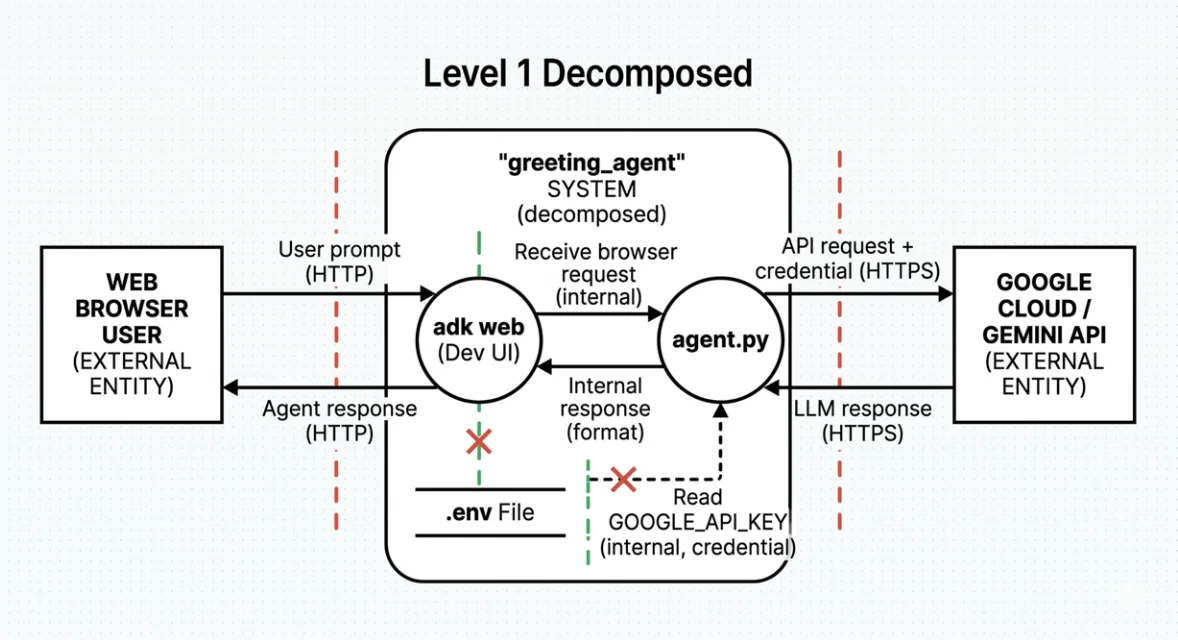
The boundaries and symbols:
- Red dashed lines (external) — left edge (browser side) and right edge (Google Cloud side). These are the outer walls.
- Green dashed line (internal) — runs between
.env Fileandagent.py. This separates the data store holding the credential from the process that reads it. - Red X marks — appear where a data flow arrow crosses a boundary. Two X marks appear in the Level 1 diagram: one where the
.envread crosses the internal green boundary intoagent.py, and one near theadk web→ browser response flow crossing the external red boundary. Every X is a question that demands an answer: what if the data here is malicious or intercepted?
Note that .env File sits inside the HOS01A Server boundary alongside adk web — not inside the .venv boundary with agent.py. This placement matters: .env is readable by anything with access to the server filesystem, not just code running inside the virtual environment.
In security DFDs, red dashed lines mark external trust boundaries (like the moat around a castle). Green dashed lines mark internal boundaries (the locked rooms inside). Where a data flow arrow crosses a trust boundary line, you mark the intersection with a red X — these are threat intersections, the exact points where an attacker could intercept, inject, or corrupt data. They are the most important locations in the diagram for a security engineer: every red X is a question that demands an answer.
STRIDE Analysis
STRIDE is a threat categorization framework. Each letter is a threat category with a corresponding security goal:
| Threat | Security Goal | Agentic AI Example | OWASP 2026 | Risk |
|---|---|---|---|---|
| Spoofing | Authenticity | A malicious agent masquerades as a “Boss Agent” to issue unauthorized commands to worker agents | ASI09: Improper Input Handling | High |
| Tampering | Integrity | Indirect prompt injection: an attacker hides instructions in a document the agent reads, hijacking its goal | ASI01: Agent Goal Hijacking | High |
| Repudiation | Non-repudiability | An agent deletes a database record but the system fails to log which agent did it or why | ASI10: Insufficient Monitoring | Medium |
| Information Disclosure | Confidentiality | An agent leaks its system prompt, API keys, or private user data during a conversation | ASI07: Sensitive Information Disclosure | High |
| Denial of Service | Availability | An attacker triggers a recursive loop (Agent A calls Agent B calls Agent A) until API credits are exhausted | ASI08: Unbounded Consumption | Medium |
| Elevation of Privilege | Authorization | A user tricks a “read-only” agent into using a write tool, or overrides its system instruction via a crafted prompt | ASI06: Excessive Agency | High |
The OWASP codes come from the OWASP Top 10 for Agentic Applications (2026). You’ll work through these in detail in Lesson 3 — for now, notice that every High-risk STRIDE category maps directly to a named OWASP item. These aren’t coincidental: OWASP derived its list specifically from the kinds of agent-level threats STRIDE surfaces.
Applying STRIDE to Each Component
Map each component from the Level 1 DFD to the STRIDE categories that apply:
| DFD Element | S | T | R | I | D | E | Specific Threat |
|---|---|---|---|---|---|---|---|
| User Prompt (Browser → Dev UI) | ✓ | ✓ | S: Attacker sends a request pretending to be an authorized admin. E: Prompt injection overrides the agent’s system instruction | ||||
.env File (Data Store) | ✓ | ✓ | T: Attacker with file system access replaces the API key. I: Key disclosed if file permissions are too permissive | ||||
adk web Dev UI (Process) | ✓ | ✓ | ✓ | ✓ | S: If exposed beyond localhost, any network user can send requests. E: Dev UI exposes debug info enabling privilege escalation | ||
agent.py (Process) | ✓ | ✓ | ✓ | R: No logging of decisions; cannot audit why the agent behaved a certain way. I: Internal state or key exposed in error messages | |||
API Request (agent.py → Gemini) | ✓ | ✓ | ✓ | R: No logging of outbound calls; cannot audit what prompts were sent. D: Quota exhausted by excessive calls | |||
LLM Response (Gemini → agent.py) | ✓ | T: A compromised or manipulated response could carry embedded instructions back into the agent’s context | |||||
| Google API Key (Credential) | ✓ | ✓ | ✓ | I: Key leaked in logs or committed to a public repo. D: Attacker abuses key to exhaust quota |
You can use an LLM to generate a STRIDE analysis tailored to your specific agent. Copy and adapt this prompt:
Role: You are a Senior DevSecOps Engineer specializing in Agentic AI architecture.

Context: I am developing an AI Agent in Python within GitHub Codespaces.

- Agent Goal: "You are a helpful assistant that greets the user.
  Ask for the user's name and greet them by name."
- Tools/Capabilities: No tools are used in this project.
- Environment: GitHub Codespaces (Linux-based container).

Task: Perform a STRIDE Threat Model analysis specifically for this agent.

1. Decompose the System: Identify the Trust Boundaries
   (e.g., User → Agent, Agent → Tools, Agent → Environment).

2. STRIDE Analysis: For each category, identify at least one
   Agentic-specific threat.

3. OWASP Alignment: Map threats to the OWASP Top 10 for Agentic AI (2026)
   (e.g., ASI01: Agent Goal Hijacking, ASI02: Tool Misuse).

4. Mitigation: Provide Python-specific code snippets or configuration
   changes to mitigate the highest-risk threats.

Output Format: A Markdown table followed by a "Remediation Guide" section.
As you work through later modules — adding tools, persistent storage, multi-agent coordination — update the Context block in this prompt. The threats change significantly as the agent gains more capabilities.
Mitigations
For each threat, a mitigation either reduces its likelihood (prevention) or reduces its impact (detection or response). Here are three worked examples for the greeting agent:
Prompt Injection (Elevation of Privilege)
Threat: An attacker crafts a user prompt that overrides the agent’s system instruction, causing the agent to behave outside its defined role.
Mitigation: Add a content safety check before passing input to the LLM. Use Gemini’s built-in safety settings to block harmful content categories.
Type: Prevention
API Key Disclosure (Information Disclosure)
Threat: The GOOGLE_API_KEY in the .env file is accidentally committed to a public GitHub repository.
Mitigation: Confirm .env is listed in .gitignore. Enable GitHub secret scanning on your repo. Rotate the key immediately if exposure is detected — a leaked key cannot be “un-leaked,” only replaced.
Type: Prevention + Detection
Quota Exhaustion (Denial of Service)
Threat: An attacker or a runaway loop makes excessive Gemini API calls, exhausting the project’s quota and making the agent unavailable.
Mitigation: Set a budget alert and API quota limit in the Google Cloud Console. Add a rate limit on the adk web endpoint if it is ever exposed beyond localhost.
Type: Prevention
adk web binds to localhost:8000 by default. That’s fine during development. But if you expose that port — through a Codespace port-forwarding rule, a cloud VM, or a misconfigured firewall — any network user can send prompts to your agent with no authentication.
The dev UI was built for local debugging. Before exposing any agent endpoint publicly, you need authentication, HTTPS, and rate limiting. None of those come with adk web out of the box.
An agent reads a webpage and follows an instruction hidden in the page content, even though that instruction contradicts its system prompt. Which STRIDE category does this fall under?
Reveal Answer & Explanation
Elevation of Privilege — and also Tampering.
This is indirect prompt injection: an attacker embeds malicious instructions in external content (a webpage, a document, an email) that the agent is expected to read. When the agent processes the content, it interprets the hidden instructions as legitimate commands and changes its behavior.
The E in STRIDE covers authorization violations — the agent was authorized to read the page, but not to let the page rewrite its goals. The T covers the integrity violation: the agent’s planned behavior was tampered with by data it trusted too much.
In later modules, as your agents gain the ability to browse the web and read files, this threat becomes one of the most important to design against.
What’s Next
You’ve mapped the greeting agent’s attack surface, identified specific threats in each component, and proposed concrete mitigations.
In Lesson 3, we apply the OWASP Top 10 for Agentic AI — a more targeted framework that goes deeper into the failure modes specific to AI systems.