Experiencing AI Agents with Tools
Extend your agent with tools — first with Google Search, then with custom Python functions, then with voice — and understand how the LLM decides when and how to call them.
What Are Tools?
In Module 1, the greeting agent could only do one thing: talk. It had no way to look something up, run a calculation, or check the current time. Whatever it said was generated entirely from the LLM’s training data.
Tools change that. A tool is a function the agent can call during a conversation — to search the web, read a database, run code, or call an API. The LLM doesn’t execute the tool itself; it decides when to call it and what arguments to pass, then ADK handles the actual execution and feeds the result back to the LLM.
This is the core of what makes agents useful beyond conversation.
System Architecture
Before writing any code, here’s how the tool-enabled agent connects to the outside world:
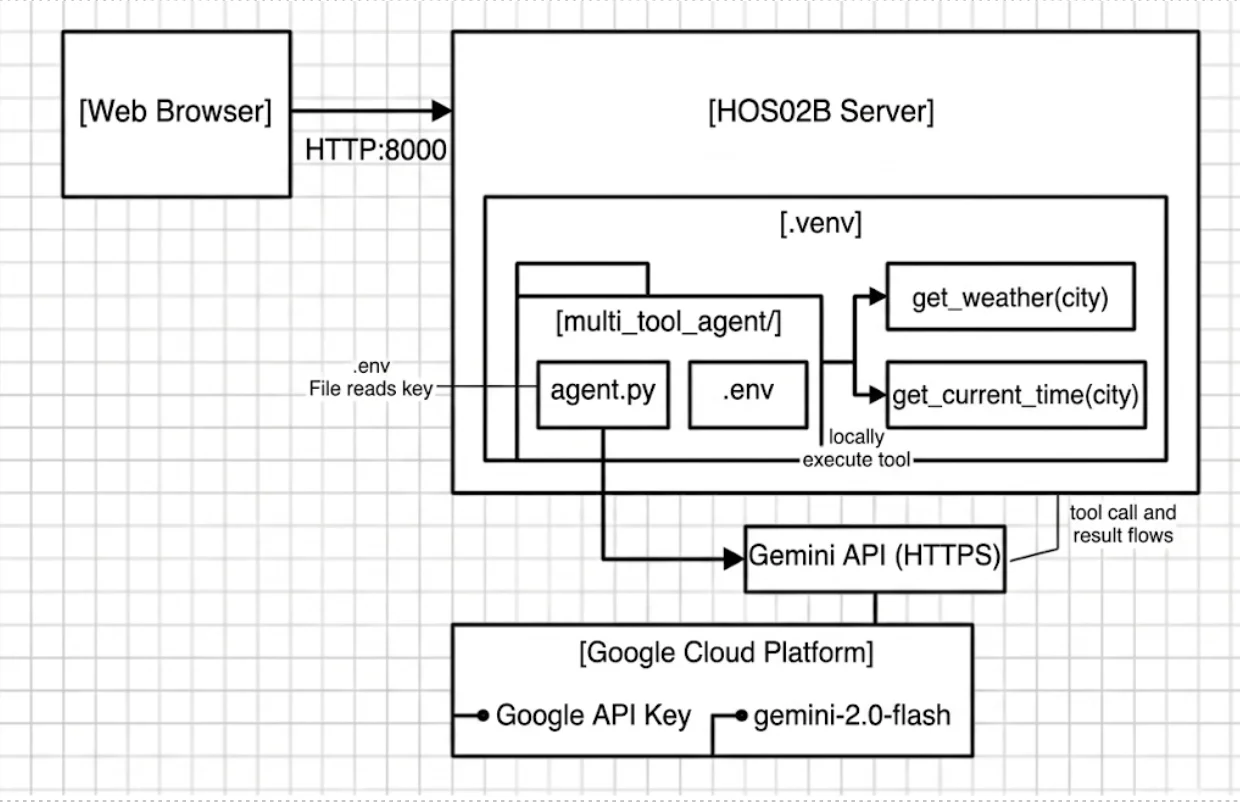
The browser talks to adk web on port 8000. agent.py sends the user prompt plus tool definitions to Gemini — the LLM responds with a tool call request rather than plain text. agent.py executes the tool locally and sends the result back to Gemini, which then produces the final response.
The BaseAgent Hierarchy
Every agent in ADK extends BaseAgent. There are three main types:
| Type | How it decides what to do | Best for |
|---|---|---|
LlmAgent (a.k.a. Agent) | Uses an LLM to reason, plan, and pick tools dynamically | Flexible, language-driven tasks |
| Workflow Agent | Follows a fixed sequence, parallel steps, or loop — no LLM needed for flow control | Predictable, structured pipelines |
| Custom Agent | Extends BaseAgent directly for fully custom logic | Specialized integrations |
This module uses LlmAgent throughout. The agent receives a user message, reasons about what tool (if any) to call, calls it, observes the result, and generates a response — all within a single turn.
Part 1: Built-in Tool — google_search
ADK ships with built-in tools for common tasks. google_search lets the agent query Google and incorporate live results into its response.
Project Structure
mkdir tool_agent
touch tool_agent/__init__.py
touch tool_agent/agent.py
touch tool_agent/.envtool_agent/__init__.py:
from . import agenttool_agent/.env — same as Module 1:
GOOGLE_GENAI_USE_VERTEXAI=FALSE
GOOGLE_API_KEY=your_actual_api_key_heretool_agent/agent.py:
from google.adk.agents import Agent
from google.adk.tools import google_search

root_agent = Agent(
    name="tool_agent",
    model="gemini-2.0-flash",
    description="Tool agent with Google Search capability.",
    instruction="""You are a helpful assistant with access to Google Search.
    Use the search tool to find current, accurate information when needed.
    Always cite that your answer comes from a web search when you use it.""",
    tools=[google_search],
)
The only difference from Module 1’s greeting agent: the tools parameter. Pass the tool object in a list — ADK registers it with the LLM so the model knows it’s available.
Run It
adk webSelect tool_agent and try:
"Do you have any news about AI this week?""Search for recent news about Google's Agent Development Kit.""What are the latest advancements in quantum computing?"
Watch the Events tab as you chat. You’ll see the agent’s thought process: it receives your prompt, decides a search is needed, calls google_search with a query, receives the results, and formulates a response. Each step is a separate event you can inspect.
The google_search built-in tool requires a billing-enabled Google Cloud project. If you get an error on first run, go to Google AI Studio, set up a billing account, and add a minimum amount. The costs for testing are minimal but the free tier does not cover grounded search.
Part 2: Custom Tools — get_weather and get_current_time
Built-in tools cover common cases. For everything else, you write a plain Python function and pass it to tools=[]. The LLM learns what your function does from its name, type hints, and docstring — so all three matter.
Project Structure
mkdir multi_tool_agent
touch multi_tool_agent/__init__.py
touch multi_tool_agent/agent.py
touch multi_tool_agent/.env
Copy your .env from tool_agent/.
multi_tool_agent/agent.py:
import datetime
from zoneinfo import ZoneInfo
from google.adk.agents import Agent


def get_weather(city: str) -> dict:
    """Retrieves the current weather report for a specified city.

    Args:
        city: The name of the city for which to retrieve the weather report.

    Returns:
        A dict with 'status' and either 'report' or 'error_message'.
    """
    if city.lower() == "new york":
        return {
            "status": "success",
            "report": (
                "The weather in New York is sunny with a temperature of 25 degrees"
                " Celsius (77 degrees Fahrenheit)."
            ),
        }
    return {
        "status": "error",
        "error_message": f"Weather information for '{city}' is not available.",
    }


def get_current_time(city: str) -> dict:
    """Returns the current time in a specified city.

    Args:
        city: The name of the city for which to retrieve the current time.

    Returns:
        A dict with 'status' and either 'report' or 'error_message'.
    """
    if city.lower() == "new york":
        tz_identifier = "America/New_York"
    else:
        return {
            "status": "error",
            "error_message": f"Sorry, I don't have timezone information for {city}.",
        }

    tz = ZoneInfo(tz_identifier)
    now = datetime.datetime.now(tz)
    return {
        "status": "success",
        "report": f"The current time in {city} is {now.strftime('%Y-%m-%d %H:%M:%S %Z%z')}",
    }


root_agent = Agent(
    name="weather_time_agent",
    model="gemini-2.0-flash",
    description="Agent to answer questions about the time and weather in a city.",
    instruction="You are a helpful agent who can answer user questions about the time and weather in a city.",
    tools=[get_weather, get_current_time],
)When you pass a Python function to tools=[], the LLM receives three pieces of information about it:
| What the LLM sees | Where it comes from | Why it matters |
|---|---|---|
| Tool name | def get_weather | The LLM uses the name to decide which tool fits the user’s request |
| Parameter names and types | city: str | The LLM populates these from the conversation |
| What the tool does | The docstring | This is the most important part — the LLM reads the docstring to decide whether to call this tool at all |
A vague or missing docstring means the LLM won’t know when to use your tool. A precise docstring means it will call it correctly without needing extra instruction.
The return value is always a dict with a "status" key ("success" or "error"). This pattern lets the LLM distinguish between a valid result and a failure, and respond accordingly — rather than silently passing None back to the user.
Run It
adk webSelect weather_time_agent and try this sequence:
"Hello there!""What time is it?"→ agent asks for a city"New York""How about the weather in New York now?""What's the weather like in Paris?"→ observe the error handling
In the Events tab, click on a tool-call event to see the exact arguments the LLM chose to pass to get_weather or get_current_time. This is the agent’s reasoning made visible.
Part 3: Voice — multi_tool_agent_with_voice
The same agent can accept voice input and respond with audio — by switching to a model that supports the Gemini Live API. No other code changes are needed.
mkdir multi_tool_agent_with_voice
touch multi_tool_agent_with_voice/__init__.py
touch multi_tool_agent_with_voice/agent.py
cp multi_tool_agent/.env multi_tool_agent_with_voice/.env
multi_tool_agent_with_voice/agent.py — copy multi_tool_agent/agent.py exactly, then change one line:
root_agent = Agent(
    name="weather_time_agent_voice",
    model="gemini-2.5-flash-preview-native-audio-dialog",  # ← only change
    description="Agent to answer questions about the time and weather in a city.",
    instruction="You are a helpful agent who can answer user questions about the time and weather in a city.",
    tools=[get_weather, get_current_time],
)
Run adk web, select weather_time_agent_voice, and enable the microphone in the UI. Try:
- “What is the weather like in New York?”
- “What time is it in New York?”
- “What about Paris?” → hear how the agent handles the error case by voice
The tools, the instruction, and the logic are identical to Part 2. The Live API model adds real-time bidirectional audio on top of the same agent framework.
The LLM calls get_weather with city=Paris and receives a dict with status=error and error_message saying weather info is not available. What should happen next?
Reveal Answer & Explanation
The LLM should relay the error to the user in natural language — something like “I’m sorry, I don’t have weather information for Paris right now.”
This is why the dict return pattern with "status" and "error_message" matters. If the function raised a Python exception instead, ADK would catch it but the LLM would have less structured information to work with. By returning a dict, the tool hands the LLM a machine-readable signal it can reason about and translate into a helpful response.
From a security perspective, the error_message field is also a potential information disclosure point — you control exactly what the LLM (and therefore the user) sees when a tool fails. Don’t put stack traces, internal paths, or system details in error messages returned to tools.
What’s Next
You now have three working agents: one that searches the web, one that calls custom Python functions, and one that does both by voice.
In Lesson 2, we threat model this expanded attack surface — tools introduce new categories of risk that the greeting agent didn’t have.