Threat Modeling LiteLLM and OpenRouter
Extend the STRIDE model to cover the LiteLLM routing layer and OpenRouter gateway — two new trust boundaries introduced when you stop calling an LLM directly.
What Changed from Module 2?
In Module 2, agent.py called the Gemini API directly — one hop to an LLM provider you chose. The dad_joke_agent adds two new components in that path:
- LiteLLM — an in-process routing layer that translates API calls before they leave the server
- OpenRouter — a third-party external gateway that forwards requests to the actual LLM provider
This single architectural change creates two new trust boundaries that didn’t exist before. The threat model grows accordingly.
The System: Data Flow Overview
The dad_joke_agent has seven data flows. Flows 3–6 are restructured compared to Module 2 — the LLM is no longer a direct dependency:
- User → Agent (HTTP): The user’s prompt travels from the browser to
adk webon port 8000. - Agent →
.envfile (file system read): At startup,agent.pyreadsOPENROUTER_API_KEYfrom the.envfile. - Agent → LiteLLM (local):
agent.pysends the user prompt and tool definitions to the LiteLLM routing layer, running in the same process. - LiteLLM → OpenRouter (HTTPS): LiteLLM translates the request and forwards it to the OpenRouter API over HTTPS.
- OpenRouter → LiteLLM → Agent (HTTPS): OpenRouter routes to GPT-4.1, receives the tool call request, and returns it via LiteLLM to
agent.py. - Agent → Tool → Agent → LiteLLM → OpenRouter (local + HTTPS):
agent.pyexecutesget_dad_joke()locally, sends the result back through LiteLLM to OpenRouter for the final response. - Agent → Browser (HTTP): The final response is sent back to the user.
The key difference from Module 2: your prompts now pass through a third party you don’t control. Every word the user types, and every tool result, travels through OpenRouter’s infrastructure before the LLM sees it.
Trust Boundaries
Five trust boundaries exist in this system. Boundaries 4 and 5 are new:
| Boundary | Components | What crosses it | Why it matters |
|---|---|---|---|
| 1 | Browser ↔ adk web | User prompt (text) | User input is untrusted — could contain injected instructions |
| 2 | LiteLLM Layer ↔ OpenRouter API | Prompt + tool definitions + API key | OpenRouter is a third-party external gateway; credentials must not be exposed in transit |
| 3 | .env file ↔ agent.py | OPENROUTER_API_KEY | File permissions determine who can read the credential |
| 4 (NEW) | LLM reasoning output ↔ Tool Execution Layer | Tool call arguments and tool return values | GPT-4.1 generates tool arguments from user input — prompt injection can propagate into local function calls |
| 5 (NEW) | agent.py ↔ LiteLLM Layer | Prompt, tool definitions, tool results | LiteLLM is an in-process translation layer, but its output crosses to an external third-party gateway (OpenRouter). This routing boundary didn’t exist when calling Gemini directly. |
Boundary 5 is subtle but important. LiteLLM runs inside your process — it’s not a network call. But it exists at the edge between your code and an external service you don’t control.
When agent.py calls LiteLlm(...), the library:
- Reformats your prompt to match OpenRouter’s expected schema
- Attaches your API key
- Makes an HTTPS request to
openrouter.ai
Step 3 is where the trust boundary is crossed. Every prompt your users type, and every tool result your agent generates, leaves your infrastructure and enters OpenRouter’s. From there, OpenRouter routes to GPT-4.1 or whichever provider you’ve configured.
What this means in practice:
- OpenRouter’s data retention policy governs whether your prompts are logged or used for training
- An outage at OpenRouter makes your agent unavailable, regardless of how reliable your own infrastructure is
- A breach at OpenRouter could expose your prompt history, API key, or tool results
- You cannot audit what happens to your data inside OpenRouter’s pipeline
This is the fundamental trade-off of third-party gateway services: you gain model flexibility and a unified API, but you lose visibility and control over data in transit.
Data Flow Diagrams
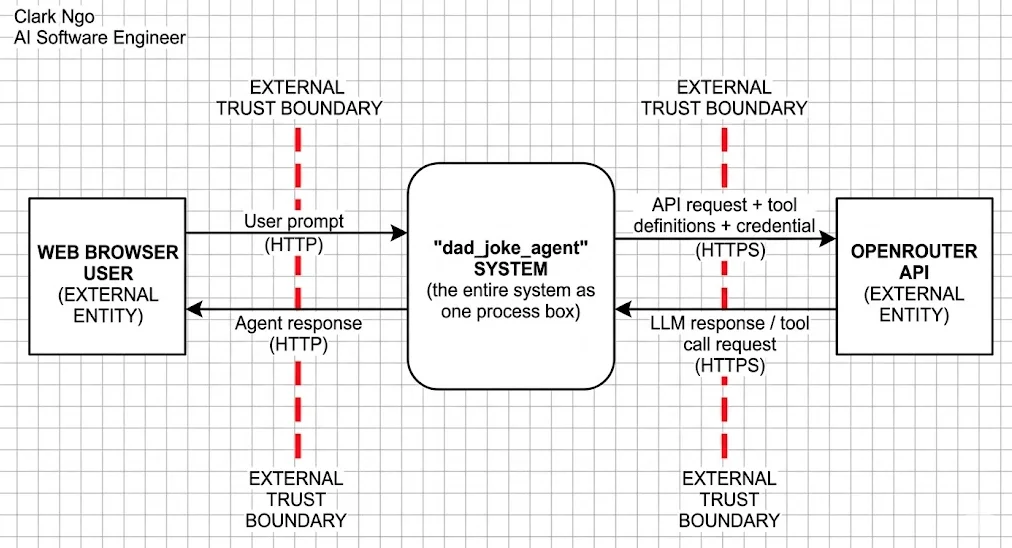
Level 0 — Context Diagram
The external actors change compared to Module 2: instead of “Google Cloud / Gemini API,” the external entity is now OpenRouter API — the gateway that handles model routing.
Level 1 — Decomposed View
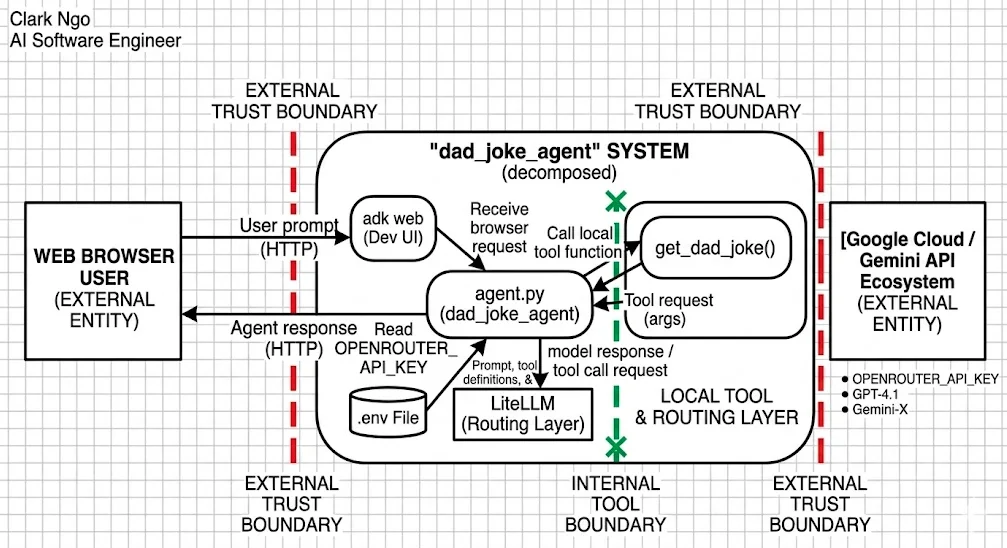
Five internal components, with two new ones compared to Module 2:
adk web(Dev UI) — receives browser requests on port 8000agent.py(dad_joke_agent) — core logic; calls LiteLLM and dispatches tool callsLiteLLM (Routing Layer)— translates and forwards requests to OpenRouter (NEW)get_dad_joke()— custom tool, executed locally.envfile — storesOPENROUTER_API_KEY
The LiteLLM Routing Layer boundary wraps the LiteLLM process. Arrows crossing it in both directions — prompts going out, LLM responses coming back — are threat intersections.
STRIDE Analysis
| DFD Element | S | T | R | I | D | E | Specific Threat |
|---|---|---|---|---|---|---|---|
| User Prompt (Browser → Dev UI) | ✓ | ✓ | S: Attacker spoofs an authorized user identity. E: Prompt injection overrides system instructions or manipulates tool arguments | ||||
.env File (Data Store) | ✓ | ✓ | T: API key tampered if file permissions are too permissive. I: OPENROUTER_API_KEY disclosed via accidental git commit | ||||
Tool Call: agent.py → get_dad_joke() | ✓ | ✓ | ✓ | ✓ | T: Tool argument manipulated via prompt injection. R: Tool calls not logged. D: Repeated invocations exhaust OpenRouter credits. E: Agent calls tool with unintended arguments | ||
Tool Result: get_dad_joke() → agent.py | ✓ | ✓ | T: Crafted tool return data influences LLM context. I: Error messages in results leak internal details | ||||
| LiteLLM Layer (Process, NEW) | ✓ | ✓ | ✓ | ✓ | T: LiteLLM version vulnerability could corrupt request translation. R: No logging of what LiteLLM sends to OpenRouter — gap in audit trail. I: Prompt content or API key exposed in LiteLLM error logs. D: LiteLLM misconfiguration causes retry loops exhausting credits | ||
agent.py (Process) | ✓ | ✓ | ✓ | T: Malicious LLM response embeds instructions into subsequent tool calls. R: No logging of agent decisions or tool dispatch. I: API key or internal state exposed in error messages | |||
| LLM Response via OpenRouter (Flow) | ✓ | T: A manipulated response from OpenRouter carries embedded instructions back into the agent’s context | |||||
| API Request to OpenRouter (Flow) | ✓ | ✓ | ✓ | R: No logging of outbound requests — cannot audit what prompts were sent. I: Prompt content contains user data sent to a third-party service. D: Quota exhausted by excessive or adversarially triggered calls | |||
adk web Dev UI (Process) | ✓ | ✓ | ✓ | ✓ | S: If exposed beyond localhost, any network user can send requests. I: Dev UI exposes event traces. D: No rate limiting. E: Debug interface enables privilege escalation |
Mitigations
Tool Parameter Injection (Tampering / Elevation of Privilege)
Threat: An attacker crafts a prompt that causes GPT-4.1 via OpenRouter to invoke get_dad_joke() with an unintended argument.
Mitigation: Validate tool arguments inside the function before execution. Log all invocations with arguments and timestamps.
Type: Prevention + Detection
Third-Party Gateway Risk (Information Disclosure / Denial of Service)
Threat: All LLM requests are routed through OpenRouter, a third-party service. A breach or policy change at OpenRouter could expose prompt data or disrupt service.
Mitigation: Review OpenRouter’s privacy and data retention policy before sending sensitive data. Avoid including PII in prompts. Implement fallback logic in LiteLLM to switch providers if OpenRouter is unavailable.
Type: Prevention + Detection
API Key Information Disclosure
Threat: The OPENROUTER_API_KEY in the .env file is accidentally committed to a public GitHub repository.
Mitigation: Confirm .env is in .gitignore. Enable GitHub secret scanning. Rotate the key immediately if exposure is detected.
Type: Prevention + Detection
Tool Call Repudiation
Threat: Tool invocations — which tool, which arguments, which timestamp — are not logged, making the agent’s actions unauditable.
Mitigation: Add structured logging inside each tool function. Store logs in a tamper-evident location separate from the agent process.
Type: Detection
Denial of Service via Tool Loop
Threat: An adversarial prompt causes the agent to invoke get_dad_joke() repeatedly, exhausting OpenRouter credits.
Mitigation: Set a budget alert and rate limit in the OpenRouter dashboard. Implement a maximum tool-call count per session.
Type: Prevention
With direct Gemini API calls, your prompt data goes to Google under Google’s terms. With OpenRouter, it goes to OpenRouter first, then to whichever downstream provider OpenRouter routes to.
That means you’re agreeing to two data processing relationships, not one — and both matter for compliance if you’re handling user data that has regulatory implications (GDPR, HIPAA, FERPA). Before using any AI gateway in production, read its data processing agreement and understand what it logs, how long it retains it, and whether it can be used to improve models.
For a dad joke agent, this is a low-stakes concern. For an agent that handles student records or medical queries, it’s a blocking issue.
OpenRouter suffers a 2-hour outage. Which STRIDE category does this represent, and what mitigation pattern addresses it?
Reveal Answer & Explanation
Denial of Service — the availability of your agent depends entirely on a third-party service you don’t control.
The mitigation pattern is provider fallback: configure LiteLLM to switch to a backup provider if the primary is unavailable. LiteLLM supports this natively through its routing and fallback configuration. For example, you can set OpenRouter as primary and a direct Gemini API call as fallback — if OpenRouter returns a 5xx error or times out, LiteLLM automatically retries with the backup provider.
model = LiteLlm(
    model="openrouter/openai/gpt-4.1",
    api_key=os.getenv("OPENROUTER_API_KEY"),
    fallbacks=["gemini/gemini-2.0-flash"],
)
This is the same defense-in-depth principle as having a secondary ISP: single-provider dependency is a single point of failure. The more your agent’s availability matters, the more important provider redundancy becomes.
What’s Next
You’ve mapped the LiteLLM routing layer and OpenRouter gateway as new trust boundaries, with the third-party data exposure risk being the most significant new threat compared to Module 2.
In Lesson 3, we encode this expanded threat model in pytm — adding the LiteLLM process and OpenRouter boundary so the report and DFD update automatically.