OWASP Threat Modeling LiteLLM and OpenRouter
Add the LiteLLM routing layer and OpenRouter gateway to the pytm model, generate the updated DFD and threat report, and build a threat analyst agent that itself runs through LiteLLM.
What’s New in the Threat Model
The Module 2 pytm model had five boundaries, three actors, five processes, one data store, and ten dataflows. The dad_joke_agent replaces the direct Gemini connection with a two-hop path through LiteLLM and OpenRouter. In pytm terms, that means:
- One new external
Actor:OpenRouter API(replacingGoogle Gemini API) - Two new
Boundaryobjects:OpenRouter / External LLM ProvidersandLiteLLM Routing Layer - One new
Process:LiteLLM (Routing Layer) - Four new
Dataflowobjects splitting the single LLM request/response into two hops
When you add these to the model, pytm surfaces new information disclosure threats on the LiteLLM-to-OpenRouter boundary — threats that were invisible in the Module 2 report.
Step 1: Install pytm and Graphviz
If already installed from a previous module, skip this step.
# GitHub Codespaces / Ubuntu Linux
sudo apt-get update && sudo apt-get install -y graphviz

# macOS
brew install graphviz
Add to requirements.txt if not already present:
pytm==1.3.1pip install -r requirements.txt
python -c "from pytm import TM; print('pytm installed successfully')"
dot -VStep 2: Write the Threat Model
Create threat_model.py in the project root (not inside dad_joke_agent/):
touch threat_model.pyfrom pytm import TM, Actor, Boundary, Dataflow, Datastore, Process, Classification
tm = TM("HOS03A Dad Joke Agent Threat Model")
tm.description = "Threat model for the HOS03A dad_joke_agent (LiteLLM + OpenRouter)."
tm.isOrdered = True
tm.mergeResponses = True
# --- Trust Boundaries ---
internet = Boundary("Internet")
openrouter_boundary = Boundary("OpenRouter / External LLM Providers") # NEW
server_boundary = Boundary("HOS03A Server")
venv_boundary = Boundary("Python Virtual Environment (.venv)")
tool_boundary = Boundary("Tool Execution Layer")
litellm_boundary = Boundary("LiteLLM Routing Layer") # NEW
# --- External Actors ---
user = Actor("Web Browser User")
user.inBoundary = internet
openrouter_api = Actor("OpenRouter API") # NEW (replaces Google Gemini API)
openrouter_api.inBoundary = openrouter_boundary
# --- Internal Processes ---
adk_web_ui = Process("adk web (Dev UI)")
adk_web_ui.inBoundary = server_boundary
adk_web_ui.sanitizesInput = False
agent_process = Process("agent.py (dad_joke_agent)")
agent_process.inBoundary = venv_boundary
agent_process.sanitizesInput = False
agent_process.validatesInput = False
litellm_process = Process("LiteLLM (Routing Layer)") # NEW
litellm_process.inBoundary = litellm_boundary
litellm_process.sanitizesInput = False
get_joke_func = Process("get_dad_joke()") # NEW
get_joke_func.inBoundary = tool_boundary
get_joke_func.sanitizesInput = False
# --- Data Store ---
env_file = Datastore(".env File")
env_file.inBoundary = server_boundary
env_file.isEncrypted = False
env_file.storesSensitiveData = True
env_file.classification = Classification.SECRET
# --- Data Flows ---
user_to_ui = Dataflow(user, adk_web_ui, "User Prompt (HTTP)")
user_to_ui.protocol = "HTTP"
user_to_ui.isEncrypted = False
user_to_ui.sanitizes = False
ui_to_agent = Dataflow(adk_web_ui, agent_process, "Routed Prompt")
ui_to_agent.sanitizes = False
env_to_agent = Dataflow(env_file, agent_process, "API Key + Config")
env_to_agent.isEncrypted = False
env_to_agent.classification = Classification.SECRET
agent_to_litellm = Dataflow(agent_process, litellm_process, "Prompt + Tool Definitions") # NEW
agent_to_litellm.sanitizes = False
litellm_to_openrouter = Dataflow( # NEW
litellm_process, openrouter_api,
"API Request with Tool Definitions (HTTPS)"
)
litellm_to_openrouter.protocol = "HTTPS"
litellm_to_openrouter.isEncrypted = True
litellm_to_openrouter.classification = Classification.SENSITIVE
openrouter_to_litellm = Dataflow( # NEW
openrouter_api, litellm_process,
"LLM Response / Tool Call Request (HTTPS)"
)
openrouter_to_litellm.protocol = "HTTPS"
openrouter_to_litellm.isEncrypted = True
litellm_to_agent = Dataflow( # NEW
litellm_process, agent_process,
"Routed LLM Response / Tool Call Request"
)
litellm_to_agent.sanitizes = False
agent_to_joke = Dataflow(agent_process, get_joke_func, "Tool Call: get_dad_joke()")
agent_to_joke.sanitizes = False
joke_to_agent = Dataflow(get_joke_func, agent_process, "Tool Result: Dad Joke")
joke_to_agent.sanitizes = False
ui_to_user = Dataflow(adk_web_ui, user, "Response (HTTP)")
ui_to_user.isEncrypted = False
if __name__ == "__main__":
tm.process()The biggest structural change from Module 2 is the LLM request path. In Module 2 it was:
agent.py → Google Gemini API (one hop, one boundary)In Module 3 it’s:
agent.py → LiteLLM → OpenRouter API (two hops, two boundaries)Each hop gets its own pytm objects. The litellm_boundary wraps the litellm_process. The openrouter_boundary wraps the openrouter_api actor.
The flows between them — litellm_to_openrouter and openrouter_to_litellm — are marked isEncrypted = True because the HTTPS connection is encrypted. But they’re also marked Classification.SENSITIVE because the prompt content is sensitive even if the transport is encrypted.
The flows between agent.py and litellm_process — agent_to_litellm and litellm_to_agent — use sanitizes = False. LiteLLM translates format but does not validate or sanitize the prompt content or the LLM response. pytm will flag Tampering threats on these flows as a result.
The key insight: more hops mean more threat intersections. Each boundary crossing is a red X on the DFD, and each red X is a question the model forces you to answer: who controls this channel, what happens if it’s compromised, and what’s your mitigation?
Step 3: Generate the DFD and Threat Report
Threat report:
python threat_model.py --report basic_template.md > threats.mdCompared to the Module 2 report, you should see additional threats covering:
- Unsanitized flows between
agent.pyand the LiteLLM layer (Tampering) - Information disclosure on the LiteLLM → OpenRouter flow (prompt content at a third-party boundary)
- The
litellm_processwithsanitizesInput = Falsegenerating Tampering and Elevation of Privilege threats
DFD diagram:
python threat_model.py --dfd | dot -Tpng -o dfd.pngYour dfd.png should show the new LiteLLM Routing Layer boundary alongside the Tool Execution Layer, with the two-hop path from agent.py through LiteLLM to OpenRouter clearly visible:
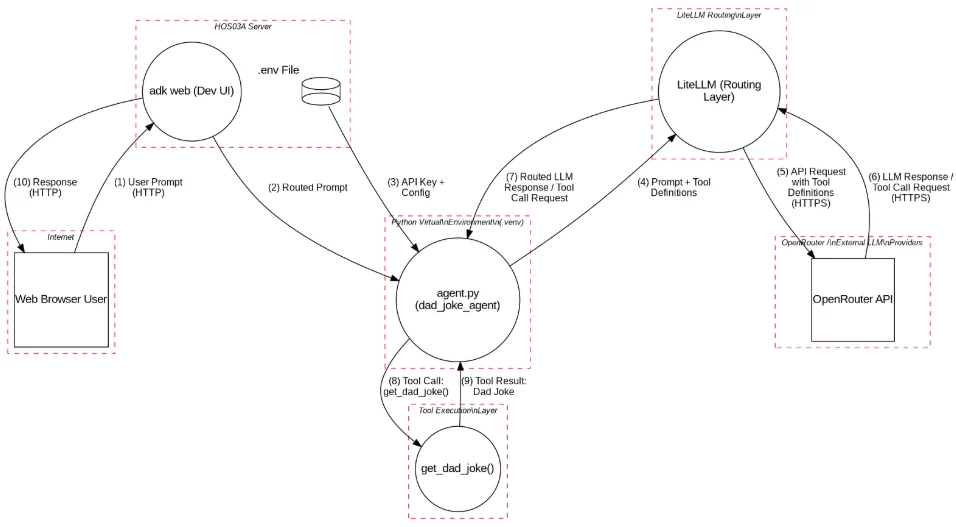
Compare with your hand-drawn Level 1 DFD from Lesson 2. Did pytm capture every element? Any component missing from the model is not being analyzed.
Step 4: Build the Security Analyst Agent
This module’s threat agent is itself a LiteLLM agent — it analyzes the threat model for a LiteLLM system using LiteLLM. The model parameter switches from a string to a LiteLlm object.
mkdir threat_agent
touch threat_agent/__init__.py
touch threat_agent/agent.py
cp dad_joke_agent/.env threat_agent/.envthreat_agent/__init__.py:
from . import agentthreat_agent/agent.py:
import os
from google.adk.agents import Agent
from google.adk.models.lite_llm import LiteLlm

_REPORT_PATH = os.path.join(os.path.dirname(__file__), "..", "threats.md")

def _load_report(path):
    resolved = os.path.abspath(path)
    if not os.path.exists(resolved):
        return "Threat report not found. Run: python threat_model.py --report threats.md"
    with open(resolved, "r", encoding="utf-8") as f:
        return f.read()

_report = _load_report(_REPORT_PATH)

model = LiteLlm(
    model="openrouter/openai/gpt-4.1",
    api_key=os.getenv("OPENROUTER_API_KEY"),
)

root_agent = Agent(
    name="threat_modeling_agent",
    model=model,
    description="A security analyst agent that reviews threat models for LiteLLM-based AI agent systems.",
    instruction=f"""
You are an expert application security engineer and AI safety specialist.

You have been given the following pytm-generated threat report for a LiteLLM + OpenRouter agent:

---
{_report}
---

Your responsibilities:
1. Answer questions about the threats clearly and accurately.
2. Identify threats pytm may have missed, especially LLM-specific and routing-specific threats such as:
   - Prompt Injection (LLM01): user input overriding system instructions or manipulating tool call arguments
   - Sensitive Information Disclosure (LLM02): model or tools revealing sensitive data in responses
   - Model Denial of Service (LLM04): adversarial prompts causing excessive or looping tool invocations
   - Insecure Output Handling (LLM05): agent output or tool results rendered without sanitization
   - Tool Misuse (ASI02): agent invoking tools with attacker-controlled arguments due to prompt injection
   - Third-Party Gateway Risk: data sent via LiteLLM to OpenRouter traverses an external third-party
     service with its own data retention, privacy, and availability policies
3. Recommend specific, actionable mitigations using STRIDE categories.
4. When asked to prioritize, use Risk = Likelihood x Impact.
5. Keep responses concise but precise. Use bullet points for lists.
6. If uncertain, say so rather than guessing.
7. Ground all answers in the system described in the threat report.
""",
)Compare the instruction with Module 2’s threat agent. One new item appears at the end of the OWASP list:
- Third-Party Gateway Risk: data sent via LiteLLM to OpenRouter traverses an external third-party
  service with its own data retention, privacy, and availability policies
This isn’t a standard OWASP LLM Top 10 entry — it’s a category that emerges specifically from the architectural choice to use a routing gateway. pytm can detect that litellm_to_openrouter has Classification.SENSITIVE, but it cannot reason about what that means operationally: that OpenRouter may log your prompts, that their uptime SLA affects your availability, or that a breach there exposes data you never intended to share externally.
The threat agent fills that reasoning gap. When you ask it “what are the risks of using OpenRouter?” it can cross-reference the pytm structural analysis with the third-party gateway framing to give a complete picture.
Note also that the threat agent itself uses LiteLLM + OpenRouter. This is intentional — it demonstrates that the same architecture you’re analyzing can be used for the analysis tool. It also means the threat agent has the same third-party gateway risk it’s being asked to reason about.
Step 5: Run the Agent and Explore Security Questions
adk webSelect threat_modeling_agent and work through these prompts:
Understanding the report:
"What are the top three threats in this system by severity?""What new threats does the LiteLLM routing layer introduce compared to the Module 2 weather agent?""Does the threat report cover the risk of sending prompts through OpenRouter? What does that risk look like?"
Exploring specific components:
"The .env file stores the API key in plaintext. What are three ways to improve this?""What threats exist at the boundary between agent.py and the LiteLLM routing layer?""What happens to the threat model if OpenRouter changes its data retention policy?"
Advanced scenarios:
"Walk me through a complete attack scenario where a third-party gateway breach exposes user prompt data.""How does the two-hop LLM path (agent → LiteLLM → OpenRouter) compare in risk to a direct API call?""If I deployed this agent in a production environment with real user data, what are the top three things I should fix first?"
The threat agent may miss threats, misclassify severity, or suggest mitigations that don’t fit your environment. This is true of any AI security tool.
When the agent recommends a mitigation, verify it against authoritative sources: OpenRouter’s documentation and data processing agreement, LiteLLM’s security documentation, OWASP guidelines, and your organization’s policies. Never ship a mitigation solely because an AI agent recommended it.
The pytm model marks litellm_to_openrouter with Classification.SENSITIVE and isEncrypted=True. If the transport is encrypted, why does pytm still flag threats on this flow?
Reveal Answer & Explanation
Because encryption protects data in transit, but not data at rest or data in use.
isEncrypted = True means an attacker cannot intercept the prompt while it’s traveling over the network (TLS protects the pipe). But it says nothing about:
- What OpenRouter does with the data after it arrives — if OpenRouter logs prompts for debugging, your sensitive data is now stored in their infrastructure, unencrypted, subject to their security practices and breach risk
- Who at OpenRouter can access that data — employees, subprocessors, or law enforcement with a valid subpoena
- How long it’s retained — indefinitely, 30 days, or until you delete it? pytm doesn’t know, and neither does your application
Classification.SENSITIVE tells pytm that the content of this flow deserves extra scrutiny beyond transport security. pytm responds by generating information disclosure threats that prompt you to think about the full data lifecycle, not just the wire-level protection.
The practical takeaway: encryption answers “can someone intercept this?” — not “is this data protected?” Those are different questions, and both matter.
What You’ve Built Across Module 3
Over three lessons you added a routing layer between your agent and its LLM:
- Lesson 1 — Built the
dad_joke_agentwith LiteLLM + OpenRouter; learned how one model string change switches providers - Lesson 2 — Mapped the new LiteLLM and OpenRouter trust boundaries with STRIDE, including the third-party data exposure risk
- Lesson 3 — Encoded both new boundaries in pytm and built a threat agent that itself uses the architecture it analyzes
Module 4 introduces structured outputs — agents that return typed JSON instead of free-form text. The first thing we’ll do is examine how schema enforcement changes both the agent’s behavior and its attack surface.