Experiencing LiteLLM and OpenRouter
Swap out the direct Gemini API for a LiteLLM + OpenRouter routing layer and build a dad joke agent that runs on GPT-4.1 — or any other model — without changing application code.
LiteLLM and OpenRouter
Modules 1 and 2 used the Gemini API directly — your agent was locked to one provider. LiteLLM and OpenRouter break that dependency.
LiteLLM is an open-source library that provides a universal interface for over 100 LLMs from providers like OpenAI, Anthropic, Google, and Azure. It standardizes all API calls to the OpenAI format, so your application code stays the same regardless of which model you’re using underneath.
OpenRouter is an AI gateway that gives you a single API key to access hundreds of models from dozens of providers. Instead of managing separate credentials for Anthropic, OpenAI, and Google, you send all requests through OpenRouter and it handles the routing.
The two work together: LiteLLM handles the in-process translation layer, and OpenRouter handles the external routing. In ADK, you swap the model parameter from a string like "gemini-2.0-flash" to a LiteLlm(...) object — and everything else stays the same.
System Architecture
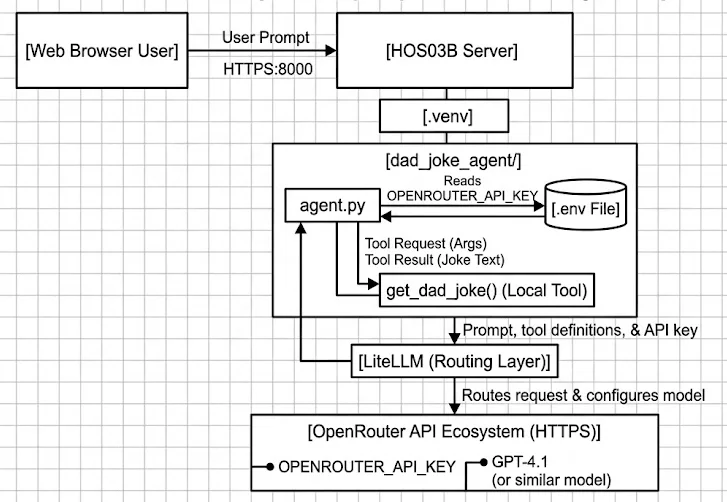
The key change: instead of agent.py calling Google’s API directly, it calls LiteLLM locally, which translates the request and forwards it to OpenRouter over HTTPS. OpenRouter routes to GPT-4.1 (or whichever model you configure). The tool execution step — get_dad_joke() running locally — is the same pattern as Module 2.
Project Structure
mkdir dad_joke_agent
touch dad_joke_agent/__init__.py
touch dad_joke_agent/agent.py
touch dad_joke_agent/.env
Add litellm to requirements.txt:
google-adk[database]==1.6.1
litellm
Install:
pip install -r requirements.txtdad_joke_agent/__init__.py:
from . import agentConfigure Your OpenRouter API Key
dad_joke_agent/.env:
OPENROUTER_API_KEY=your_actual_openrouter_key_hereTo get a key:
- Go to openrouter.ai and sign in
- Navigate to Settings → Keys
- Click Create API Key, name it (e.g. “dev”), and copy the generated key
- Paste it into your
.envfile
Unlike Google AI Studio’s free tier, OpenRouter requires you to add credits before you can make API calls. The amounts are small for testing, but you will get an authentication or quota error on first run if your account has a zero balance.
Add a small credit balance in the OpenRouter dashboard before running the agent.
dad_joke_agent/agent.py
import os
import random
from google.adk.agents import Agent
from google.adk.models.lite_llm import LiteLlm

model = LiteLlm(
    model="openrouter/openai/gpt-4.1",
    api_key=os.getenv("OPENROUTER_API_KEY"),
)


def get_dad_joke() -> dict:
    """Returns a random dad joke from a predefined list.

    Returns:
        A dict with 'status' and 'joke'.
    """
    jokes = [
        "Why don't scientists trust atoms? Because they make up everything!",
        "I'm reading a book about anti-gravity. It's impossible to put down.",
        "Did you hear about the mathematician who's afraid of negative numbers? He'll stop at nothing to avoid them.",
        "Why did the scarecrow win an award? Because he was outstanding in his field.",
        "I would tell you a joke about construction, but I'm still working on it.",
        "What do you call a fake noodle? An impasta.",
        "Why can't you give Elsa a balloon? Because she'll let it go.",
    ]
    return {"status": "success", "joke": random.choice(jokes)}


root_agent = Agent(
    name="dad_joke_agent",
    model=model,
    description="An agent that tells dad jokes using a predefined joke list.",
    instruction="""You are a helpful assistant that tells dad jokes.
    Only use the get_dad_joke tool to tell jokes. Never generate jokes on your own.""",
    tools=[get_dad_joke],
)Three things in this file are different from every previous agent:
1. The import:
from google.adk.models.lite_llm import LiteLlmADK ships with a LiteLlm wrapper class that plugs into its model layer. You pass it a LiteLlm object anywhere ADK expects a model string.
2. The model string format:
model="openrouter/openai/gpt-4.1"LiteLLM uses a provider/model prefix convention. openrouter/ tells LiteLLM to route through OpenRouter. openai/gpt-4.1 is OpenRouter’s identifier for GPT-4.1. To use a different model, change only this string — nothing else in your code needs to change:
"openrouter/anthropic/claude-sonnet-4"→ Claude Sonnet 4 via Anthropic"openrouter/google/gemini-2.0-flash-001"→ Gemini 2.0 Flash via Google"openrouter/meta-llama/llama-3.1-8b-instruct"→ Llama 3.1 via Meta
3. The tool:
get_dad_joke() takes no arguments — there’s nothing for the LLM to inject. This makes it the simplest possible tool from a security standpoint. The tool contract is the same as Module 2: name, type hints, docstring, and a dict return value with a "status" key.
Run It
adk webSelect dad_joke_agent and try:
"Hey! Please tell me a joke.""Tell me another one.""Can you make up your own joke?"— observe whether the agent stays within its instruction
In the Events tab, watch the tool call event. You’ll see the LLM request get_dad_joke() with no arguments, ADK execute it locally, and the joke result feed back into the final response.
Optional: Swap to Claude Sonnet 4
The only change needed to use a completely different LLM provider is the model string:
model = LiteLlm(
    model="openrouter/anthropic/claude-sonnet-4",
    api_key=os.getenv("OPENROUTER_API_KEY"),
)
Same agent, same tool, same instruction — different model underneath. This is the portability LiteLLM provides: your application code is decoupled from your model choice.
The agent instruction says to only use get_dad_joke to tell jokes. A user asks: Can you make up a joke yourself? What should happen, and what does it reveal about instruction-based controls?
Reveal Answer & Explanation
The agent should refuse to make up a joke and instead call get_dad_joke() — or explain that it can only tell jokes from its tool. Whether it complies depends entirely on the LLM’s alignment with the instruction.
This reveals an important limit of instruction-based controls: the instruction field is a behavioral guideline, not a security enforcement mechanism. A sufficiently creative user prompt, or a model that weights instructions loosely, can cause the agent to deviate. If “never generate jokes on your own” were a real security requirement (say, copyright compliance), you couldn’t rely solely on the instruction — you’d need to validate the response to ensure it contains only output derived from the tool.
This is the core tension in agentic security: the same LLM that makes the agent flexible also makes it difficult to guarantee behavior absolutely. Hard constraints belong in code; soft constraints belong in instructions.
What’s Next
You now have an agent that routes through LiteLLM and OpenRouter and can be pointed at any model with a one-line change.
In Lesson 2, we threat model this new routing layer — OpenRouter is a third-party service your prompts now pass through, which introduces trust boundaries and data exposure risks that didn’t exist with direct API calls.